Introduction: Time Looks Like Math, But It Doesn't Behave Like It
Ask someone to add 45 and 30 and they answer 75 without blinking. Ask them to add 45 minutes and 30 minutes and a surprising number will still say "75" — and be wrong. The answer is 1 hour 15 minutes, because once you pass 60, minutes roll over into a whole new unit. Time looks like ordinary decimal arithmetic, but it runs on a different number system, and that mismatch is exactly why time math trips people up.
This guide is not about productivity or time tracking. It is about the arithmetic itself: why adding and subtracting hours and minutes goes wrong, how to do it correctly by hand, and the one conversion — minutes to decimal hours — that quietly breaks payroll and invoices every day.
The Real Problem: Time Runs in Base 60, Not Base 10
Our everyday number system is base 10: each column carries over when it reaches 10. Time inherited a base 60 system from ancient Babylonian astronomers — 60 seconds in a minute, 60 minutes in an hour. That single fact is the source of nearly every time-math mistake.
When you add a column of minutes and the total reaches 60, you do not carry at 100 like money or normal decimals — you carry at 60. So 50 minutes plus 20 minutes is not "70 minutes" as a final answer; it is 1 hour and 10 minutes. Your brain, trained on base 10, wants to carry at 100, and that instinct is wrong for the minutes and seconds columns.
- Seconds carry into minutes at 60
- Minutes carry into hours at 60
- Hours carry into days at 24 — yet another base
So a single time value can mix three different bases at once. No wonder it feels harder than it should.
How to Add Time Step by Step
The reliable method is to keep the units in separate columns, add each column, then normalize from the smallest unit up.
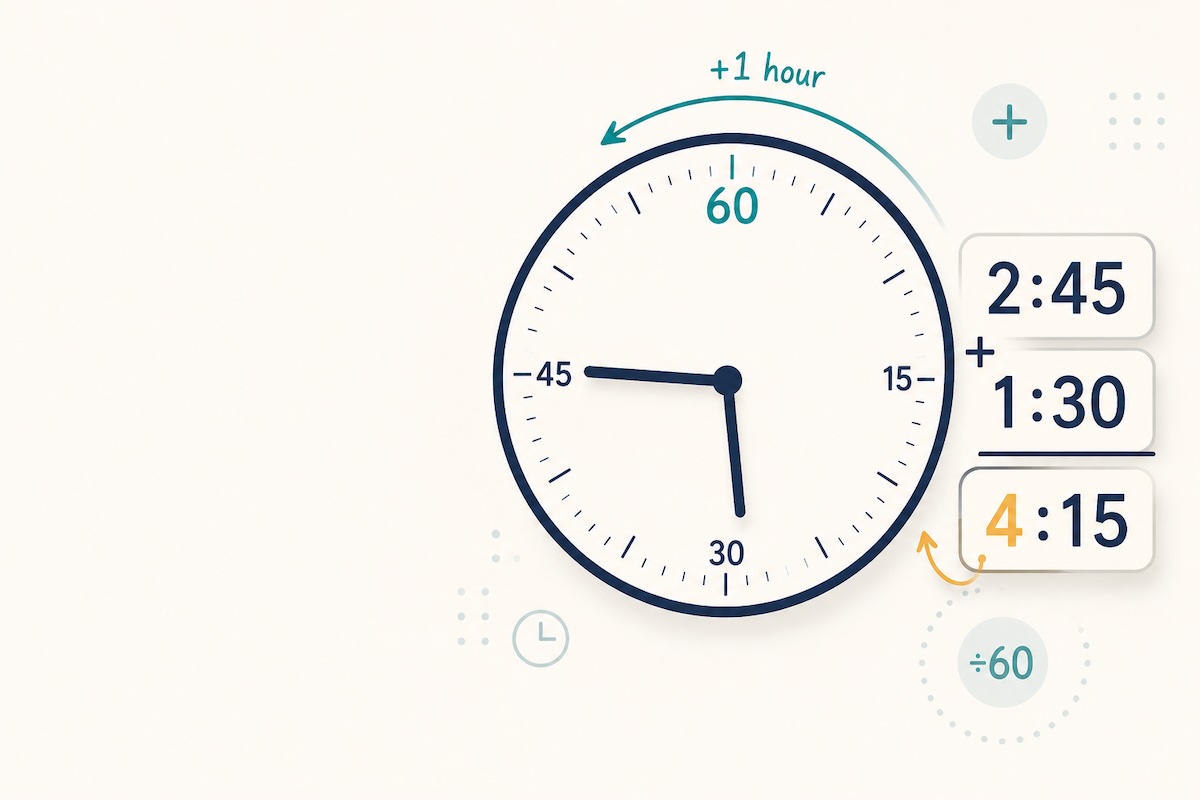
Example: Add 2 h 45 m + 1 h 30 m
- Add minutes: 45 + 30 = 75 minutes
- Normalize: 75 minutes = 1 hour 15 minutes (subtract 60, carry 1 hour)
- Add hours: 2 + 1 + 1 carried = 4 hours
- Result: 4 hours 15 minutes
The carry step is where people slip. If you simply wrote "2 h 45 m + 1 h 30 m = 3 h 75 m" and stopped, the hours are right but the minutes are illegal — there is no such thing as 75 minutes on a clock. Always normalize.
How to Subtract Time: Borrowing 60, Not 100
Subtraction has the same twist in reverse. When the minutes you are subtracting are larger than the minutes you have, you borrow one hour — but that borrowed hour is worth 60 minutes, not 100.
Example: Subtract 5 h 15 m − 2 h 40 m
- Minutes: 15 − 40 is negative, so borrow 1 hour from the 5
- The borrowed hour adds 60 minutes: 15 + 60 = 75 minutes
- Now minutes: 75 − 40 = 35 minutes
- Hours: (5 − 1 borrowed) − 2 = 2 hours
- Result: 2 hours 35 minutes
Borrow 100 instead of 60 — the base-10 reflex — and you would get 2 h 75 m, a 40-minute error. This is the single most common time-subtraction mistake.
Crossing Midnight and the 12-Hour Trap
Durations that span midnight expose another hazard: a shift from 9:00 PM to 5:00 AM is not "5 minus 9 = negative four hours." The clock wrapped around. The clean fix is to convert to a 24-hour clock first, and add 24 hours to the end time when it lands on the next day.
- 9:00 PM becomes 21:00; 5:00 AM the next day becomes 05:00 + 24:00 = 29:00
- Duration = 29:00 − 21:00 = 8 hours
The 12-hour AM/PM system is great for reading a clock and terrible for arithmetic. For any calculation that crosses noon or midnight, switch to 24-hour time first and the negatives disappear.
Decimal Hours: The Conversion That Breaks Payroll
Here is the mistake that costs real money. To bill or pay for 2 hours and 45 minutes, you cannot write "2.45 hours." Minutes are sixtieths of an hour, so you must divide by 60, not treat them as decimal places.
Decimal hours = hours + (minutes ÷ 60)
- 45 minutes = 45 ÷ 60 = 0.75 hours → 2 h 45 m = 2.75 hours
- 15 minutes = 0.25 hours, 30 minutes = 0.50 hours, 20 minutes = 0.33 hours
Writing 2.45 instead of 2.75 understates the time by 18 minutes per entry — across a timesheet that compounds into hours of unpaid or over-billed work. Whenever you move time into a spreadsheet for multiplication by a rate, convert to decimal hours first.
A Quick Checklist of Common Time-Math Mistakes
- Leaving an answer with 60 or more minutes (always normalize)
- Borrowing 100 instead of 60 when subtracting minutes
- Treating minutes as decimals (2.45 h instead of 2.75 h)
- Subtracting across midnight without wrapping to a 24-hour clock
- Forgetting that hours carry into days at 24, not 60 or 100
When to Stop Doing It by Hand
Understanding the mechanics is worth it — it tells you when an answer is obviously wrong. But for repeated work, totals across many entries, or anything that feeds an invoice, let a tool carry the base-60 logic for you. Our free time calculator adds and subtracts hours, minutes, and seconds, converts to and from decimal hours, and handles spans that cross midnight without the borrowing headaches.
If your problem is really about the gap between two dates — days, weeks, or working days — rather than a clock duration, reach for the date calculator instead, which is built for calendar arithmetic. For the productivity side of the clock, our guide to staying on top of work hours takes the tracking angle, while counting the days between two dates covers calendar spans rather than clock durations.
Conclusion
Time math is not hard because the numbers are large; it is hard because the rules quietly change between columns — base 60 for minutes and seconds, base 24 for hours, base 10 nowhere that matters. Once you know to carry and borrow at 60, normalize every answer, switch to 24-hour time before crossing midnight, and divide minutes by 60 for decimal hours, the mistakes stop. Master those five habits and you will catch errors that calculators and spreadsheets happily produce when fed the wrong format.