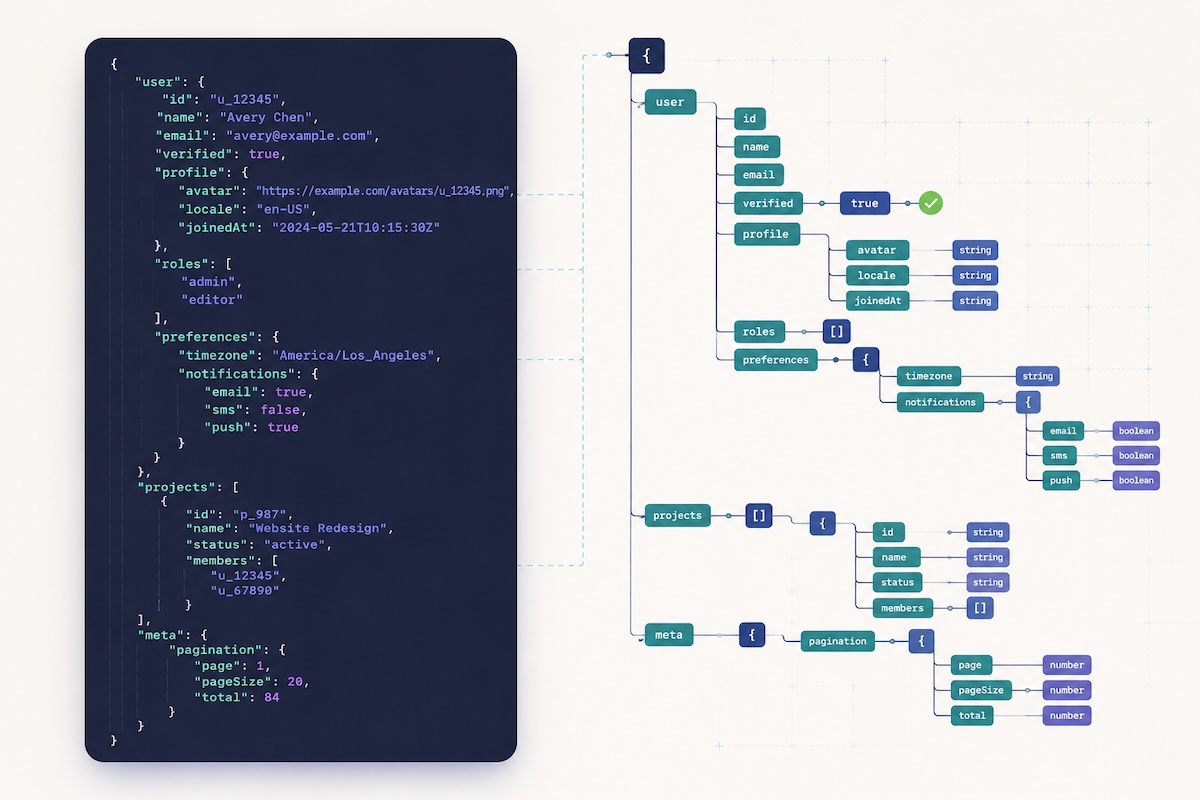
JSON Schema is the contract that says “this JSON document is shaped correctly.” In ten minutes you can learn the seven core types, the keywords that catch 95% of real-world validation bugs, and how to wire a schema into Ajv (Node.js) or jsonschema (Python). This guide walks through the syntax from first principles, with two real-world examples (a signup-request validator and a config-file validator), the most common mistakes engineers make, and a frank comparison of when JSON Schema is the right tool versus OpenAPI or TypeScript types.
The Seven Core JSON Schema Types
Every JSON value is one of seven types: string, number, integer, boolean, object, array, or null. Note that integer is a JSON Schema convenience — raw JSON only has number — but the schema layer enforces “no decimal places.” A minimal schema declaring a single type looks like this:
{
  "type": "string"
}
That schema validates any string and rejects everything else. You can also accept a union of types with an array:
{
  "type": ["string", "null"]
}
That accepts a string or an explicit null — useful for optional fields you want to keep present in the payload rather than omitting. Before you write more than a one-line schema, paste your JSON sample into our JSON formatter to confirm it parses and to see the structure pretty-printed — type errors almost always come from a misread shape.
Object Properties, Required Fields, and additionalProperties
Most real validation work happens on objects. The three keywords you will use every day are properties, required, and additionalProperties:
{
  "type": "object",
  "properties": {
    "email":    { "type": "string" },
    "age":      { "type": "integer" },
    "verified": { "type": "boolean" }
  },
  "required": ["email"],
  "additionalProperties": false
}
Three things to notice. First, properties describes each field but does NOT make any of them required — without the required array, every property is optional. Second, required is a separate list of property names that must be present (presence only — you still need type or other keywords to validate the value). Third, additionalProperties: false rejects any property not listed in properties — without this line, the schema accepts arbitrary extra fields silently, which is the single most common cause of “why did this bad payload pass validation?” bug reports.
Set additionalProperties: false by default and remove it only when you genuinely want a free-form object. For maps with arbitrary keys but a known value type, use additionalProperties as a schema instead of a boolean:
{
  "type": "object",
  "additionalProperties": { "type": "number" }
}
That validates an object where every value is a number, regardless of the key names — perfect for things like price lookup tables or feature-flag percentages.
String Validation: minLength, pattern, format, and enum
Real-world string validation goes beyond “is it a string.” The high-leverage keywords:
minLength/maxLength— integer bounds on UTF-16 code units (not bytes; not graphemes)pattern— ECMA-262 regex the string must match somewhere (use^...$anchors for a full match)format— named formats likeemail,uri,date,date-time,uuid,ipv4,ipv6enum— a fixed list of allowed values (works for any type, not just strings)const— a single allowed value (equivalent to a one-item enum)
A practical example for a username field:
{
  "type": "string",
  "minLength": 3,
  "maxLength": 20,
  "pattern": "^[a-zA-Z0-9_]+$"
}
One gotcha: format is informational by default in older JSON Schema drafts — you must enable format assertion in your validator (Ajv requires ajv-formats; Python jsonschema needs format_checker). Without it, "format": "email" documents intent but does not actually reject invalid emails. If you need to generate IDs to validate against a uuid format, our UUID generator produces RFC 4122 v4 IDs that any conforming validator will accept.
Number Validation: minimum, maximum, multipleOf
For numbers and integers, the validation keywords are arithmetic:
minimum/maximum— inclusive boundsexclusiveMinimum/exclusiveMaximum— exclusive bounds (in Draft 2020-12 these take a number; in older drafts they took a boolean)multipleOf— the value must be a multiple of this number (useful for currency cents, quantized values)
Validating a percentage field that must be 0–100 in 0.01 increments:
{
  "type": "number",
  "minimum": 0,
  "maximum": 100,
  "multipleOf": 0.01
}
multipleOf has a floating-point trap: 0.1 is not exactly representable in IEEE 754, so { "multipleOf": 0.1 } will sometimes reject values you expect to pass. For money, store and validate as integer cents ({ "type": "integer", "minimum": 0 }) instead of floats — this is the same precision argument behind storing prices in the smallest currency unit everywhere else in your stack.
Array Validation: items, minItems, uniqueItems
For arrays the workhorses are items (schema applied to every element), minItems / maxItems (length bounds), and uniqueItems (rejects duplicates, by deep equality). A list of unique tags:
{
  "type": "array",
  "items": { "type": "string", "minLength": 1 },
  "minItems": 1,
  "maxItems": 10,
  "uniqueItems": true
}
For positional tuples where each index has a different schema, use prefixItems (Draft 2020-12) or items as an array (older drafts). Example: a coordinate pair where index 0 is longitude and index 1 is latitude:
{
  "type": "array",
  "prefixItems": [
    { "type": "number", "minimum": -180, "maximum": 180 },
    { "type": "number", "minimum":  -90, "maximum":  90 }
  ],
  "items": false
}
The trailing "items": false rejects any extra elements beyond the two declared positions — the array equivalent of additionalProperties: false.
Schema Composition: $ref, allOf, oneOf, anyOf
Once your schemas grow past a single page, you will want to break them up and combine them. JSON Schema has four composition keywords:
$ref— reuse another schema by JSON Pointer (e.g.,"#/$defs/address"or an external URL)allOf— data must validate against every subschema (intersection / mixin)anyOf— data must validate against at least one (union, OK if multiple match)oneOf— data must validate against exactly one (XOR — rejects if zero or multiple match)
A reusable address schema referenced from two parent schemas:
{
  "$defs": {
    "address": {
      "type": "object",
      "properties": {
        "street":  { "type": "string" },
        "city":    { "type": "string" },
        "country": { "type": "string", "minLength": 2, "maxLength": 2 }
      },
      "required": ["street", "city", "country"]
    }
  },
  "type": "object",
  "properties": {
    "shipping": { "$ref": "#/$defs/address" },
    "billing":  { "$ref": "#/$defs/address" }
  }
}
For discriminated unions (event types, message kinds), oneOf with a const discriminator is the standard pattern:
{
  "oneOf": [
    { "type": "object", "properties": { "kind": { "const": "email" },
        "to": { "type": "string", "format": "email" } }, "required": ["kind", "to"] },
    { "type": "object", "properties": { "kind": { "const": "sms" },
        "phone": { "type": "string", "pattern": "^\\+[1-9]\\d{1,14}$" } }, "required": ["kind", "phone"] }
  ]
}
Real Example: Validating an API Signup Request
Putting every keyword together, here is a production-quality schema for a signup endpoint:
{
  "$schema": "https://json-schema.org/draft/2020-12/schema",
  "title": "SignupRequest",
  "type": "object",
  "properties": {
    "email":     { "type": "string", "format": "email", "maxLength": 254 },
    "password":  { "type": "string", "minLength": 12, "maxLength": 128 },
    "username":  { "type": "string", "pattern": "^[a-zA-Z0-9_]{3,20}$" },
    "age":       { "type": "integer", "minimum": 13, "maximum": 120 },
    "country":   { "type": "string", "enum": ["US", "UK", "CA", "AU"] },
    "newsletter":{ "type": "boolean", "default": false },
    "referrals": { "type": "array", "items": { "type": "string", "format": "email" },
                   "maxItems": 5, "uniqueItems": true }
  },
  "required": ["email", "password", "username", "age", "country"],
  "additionalProperties": false
}
This schema enforces the email format (with the maximum length from RFC 5321), a minimum 12-character password (NIST SP 800-63B recommendation), a regex-validated username, an integer age within plausible bounds, a closed enum of supported countries, an optional boolean with a documented default, and an optional referral list capped at 5 unique emails. The trailing additionalProperties: false ensures any client typo (passwd instead of password) is caught at the validation layer rather than silently ignored.
Schema Versioning and Tooling: Ajv, jsonschema, Online Validators
Declare which draft you target with the $schema keyword at the root: https://json-schema.org/draft/2020-12/schema (current), draft/2019-09/schema, draft-07/schema, or older. Validators behave differently across drafts (notably exclusiveMinimum changed from boolean to number, and Draft 2020-12 introduced prefixItems). Setting $schema explicitly avoids ambiguity and lets validators load the right meta-schema.
The two production-grade validators most teams reach for:
- Ajv (Node.js / browser) — fastest JS validator, supports Draft 2020-12. Install
ajvandajv-formatstogether if you useformat. Compile schemas once at startup withconst validate = ajv.compile(schema), then callvalidate(data)on every request — this is 10–100× faster than re-compiling per call. - jsonschema (Python) — the reference Python validator. Use
Draft202012Validator(schema).validate(data)or iterate.iter_errors(data)to surface all errors at once instead of failing on the first.
For quick iteration without writing code, paste your schema and a sample payload into our JSON formatter to confirm both parse, then run them through a browser-based validator (jsonschemavalidator.net, jsonschemalint.com). When debugging an unexpected validation failure, our diff checker is invaluable for comparing the failing payload against a known-good payload to spot the offending field at a glance.
JSON Schema vs OpenAPI vs TypeScript: When to Reach for Each
JSON Schema, OpenAPI, and TypeScript types all describe data shapes, but they solve different problems and you usually want some combination of the three.
- TypeScript types are compile-time only. They vanish at runtime, so a malformed API payload will silently corrupt your program if you trust the type without validating. Great for developer ergonomics, useless for runtime safety.
- JSON Schema is runtime validation that works in any language. Use it at API boundaries, for config files, for database documents, and for any cross-language data contract. A single schema can drive validation in your Node frontend, Python backend, and Go worker without rewriting.
- OpenAPI (formerly Swagger) is a superset that wraps JSON Schema inside an API description. It adds endpoints, methods, status codes, authentication, examples, and tooling for client SDK generation. Use OpenAPI when you are describing an HTTP API and want documentation, client codegen, and validation in one document.
A common stack: write the JSON Schema as the source of truth, generate TypeScript types from it (with json-schema-to-typescript or similar), and embed the same schema inside an OpenAPI spec for HTTP routes. You get compile-time types, runtime validation, and API docs from one shared source — no three-way drift to maintain. If your stack lives mostly in YAML configs, our YAML to JSON converter lets you author in YAML and validate against the same schema.
Common JSON Schema Mistakes
1. Forgetting additionalProperties: false
Without this line, any extra fields pass validation silently. A client typo like { "emial": "x@y.com" } would validate as “no email present + an extra unknown field” rather than the error you want. Add it by default; remove it only when you genuinely want a free-form object.
2. Confusing required with type
Listing a property under properties does NOT make it required — you must also add it to the required array. Conversely, required only checks presence: a present-but-wrong-type field still fails the type check, but only because of the type, not the required.
3. Using format without enabling assertion
In Ajv, you must require('ajv-formats')(ajv). In Python jsonschema, pass format_checker=FormatChecker(). Without this, { "format": "email" } is metadata only and accepts any string.
4. oneOf where anyOf is correct
oneOf rejects data that matches more than one subschema. If your subschemas overlap (a value that is both a positive integer and a multiple of 5), oneOf will reject — you probably meant anyOf. Use oneOf only for genuinely disjoint cases like discriminated unions.
5. Treating multipleOf with floats
IEEE 754 floats cannot exactly represent 0.1, 0.2, etc. { "multipleOf": 0.1 } will sometimes reject values you expect to pass. For money or other quantized values, validate as integer units (cents, basis points) instead of decimal floats.
6. Recompiling schemas on every request
Ajv’s compile() is expensive; the compiled validator function is fast. Compile once at module load, store the function, reuse it. The same applies to Python jsonschema validators — instantiate Draft202012Validator(schema) once and reuse.
Conclusion: A 10-Minute Investment with a Long Payoff
JSON Schema looks verbose at first — the schema is often longer than the data it validates — but the verbosity is the point. Every constraint you encode is one less bug, one less corrupt database row, one less production incident triggered by a malformed payload. Start by validating your top three API endpoints, then your config files, then your cross-service messages. Within a sprint you will have caught at least one bug that would have shipped without it.
Begin with the schema in this guide as a template, paste your existing payloads into our JSON formatter to inspect their actual shape, and iterate. Pair JSON Schema with our diff checker to compare passing and failing payloads, and with our regex tester to debug any pattern validations that are misbehaving. Ten minutes spent on schemas today saves hours of debugging next quarter.